



Why Sustainability Matters in Security Infrastructure
Explore how sustainable key management systems can reduce energy costs without compromising security.
5 min read

Your early morning setup crew is arriving. It’s 6:00 am, still dark and raining. There’s a lot of prep your crew needs to do before the day shift clocks in, but you get a call. One of the technicians needs the roof access key. A leak from the storm is preventing the machinery from starting up. But no one knows where the key is.
The log shows it was checked out at 10:00 pm by a third shift technician, but there’s no check in recorded. Did the tech bring it back? Is it just sitting on their desk? Did someone take it from them without logging the handover?
This scenario probably sounds familiar to any organization that operates 24/7. Manufacturing, healthcare, property management, law enforcement, the list goes on. This gap in key accountability can grind business to a halt.
Manual processes are no longer enough. Paper logs will be full of errors. Staff exchange keys in the field and never update records. These problems can quickly lead to security, safety, and compliance risks.
ecos closes that accountability gap with automated, electronic, mobile-enabled key transfers. Mobile-reported handovers are timestamped and digitally signed, no matter where they occur. There is a complete chain of custody for mission-critical keys that stays intact across every shift and worksite.
If you want operational agility in the field, you need agile access control. Otherwise, everything remains stuck in the 20th century. This article examines how the needs of modern businesses have outpaced the capabilities of legacy key management approaches. And how mobile-enabled key systems, such as those from ecos, can open up whole new ways of working without sacrificing security and accountability.
Most key management vendors focus on cabinet features—such as access control, audit trails, and digital logs—but overlook what happens after a key leaves the system. Keys are handed off in parking lots. Paper logs are filled out in shorthand or just skipped. When something goes wrong, there’s no record of who had what, when, or why it wasn’t returned.
This isn’t a minor gap; it’s a core business process with the potential to become a major, systemic failure point that compromises security, compliance, and operations.
Let’s look at the realities of shift changes and why traditional key control methods can’t keep up.

Many key systems are designed to manage transactions only at the cabinet. But in practice, out in the real world, keys usually need to be transferred in the field. Traditional key cabinets can only scan tags present right there. If it’s in the field, it’s undocumented, which creates blind spots. A key can be "in" the cabinet even when it’s actually sitting in a technician’s pocket.
Your overnight technician leaves at 6:00 AM, but the morning shift doesn’t start until 6:30. If there’s an emergency during the gap, getting special key access might require that technician to drive all the way back in.
If you can only exchange keys in person on a large campus, your system will create much unnecessary travel time. Accountability also tends to suffer when compliance is impractical. People are more prone to look for shortcuts.
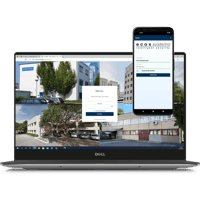
The ecos app allows your team to securely transfer keys and equipment anywhere in your facility or in the field, with full logging. The app prompts both parties to authenticate, confirm the transfer, and digitally sign. It creates an airtight chain of custody no matter when or where the exchange happens.
Many key systems are designed only to manage permanent employees. If a contractor or temporary employee needs a key, you either need to fully register them or have someone sign a key out for them. So you’re either taking extra time or creating a potential new accountability gap.
ecos makes it easy to manage the real-world problem of temporary access.
Here’s how it works:
Every mobile handover is logged with GPS coordinates, so your managers and auditors can verify not just who transferred the key, but where.
On maintenance or security teams, shift changes often involve handing over many different keys. Instead of logging them one by one, ecos systems support batch transfers. Select all the keys for a handover in the app just as easily as you can select a single key.
If a handover is started but not completed, the system automatically flags it as incomplete and sends alerts to supervisors. No issue slips through the cracks.
ecos requires digital signatures from both parties in a mobile handover. These are legally binding, tamper-proof, and stored permanently in the digital logbook. And if a user doesn’t have a mobile device, they can sign on the cabinet touchscreen to create the same secure, verifiable record.
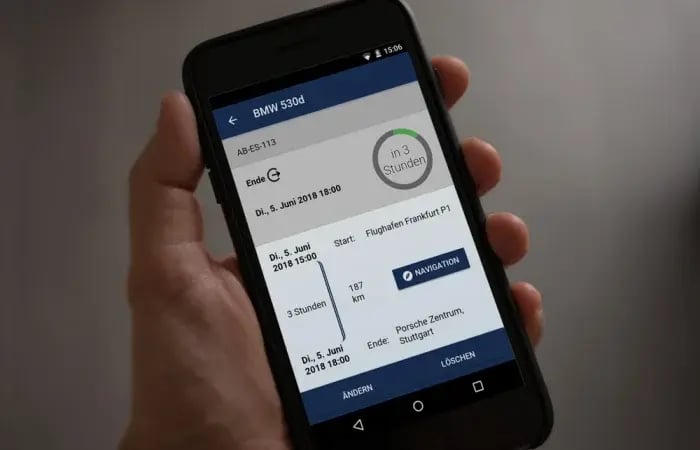
Not only does mobile-powered physical key management make life easier for your staff, but it also makes running the business easier for leadership. Managers don’t need to wait for daily updates from legacy key systems or paper records. They can manage operations in real time through the ecos dashboard. If an issue arises, they can intervene immediately.
ecos key systems automatically generate shift-specific audit reports you can access on demand. They include:
When a key isn’t returned or a transfer is incomplete, the system flags it immediately.
ecos tracks not just the exception, but its resolution:
Beyond compliance, ecos systems can provide many operational insights:
Unions can use a dedicated monitoring account to look up employee-related data in the system. ecos systems can easily accommodate this requirement.
No system is perfect, but many key system vendors will avoid discussing what happens when workflows break down. If you want real-world reliability, you need to plan for the problems too. ecos provides clear, actionable recovery protocols that quickly restore control.
When someone doesn’t return their keys on deadline, the ecos system issues an immediate alert. That helps keep staff accountable both for keys and their work schedule.
Sometimes a worker will begin a key return and get called away. The system sees the partial return and can’t verify that the key is in the cabinet. To prevent this, ecos key systems flag incomplete transfers in real time. Supervisors receive alerts so they can immediately document partial returns with notes or photos.
For equipment tracking, storage systems can track each component individually, making sure accountability remains granular rather than all-or-nothing.
You usually can’t simply shut down a business because power or network service is out. You need a key system that stays operational even under emergency conditions.
ecos cabinets can operate in standalone mode thanks to dual-database architecture. The cabinet itself stores a record of all users and their access rights in tandem with the central cloud repository. After connectivity is restored, logs sync back up automatically. No data loss. No manual re-entry.
For emergency access, two integrated safety locks allow authorized personnel to open the cabinet and its individual key slots manually, tool-free and quickly.
Even small inefficiencies at shift change add up quickly. Two minutes here or there can add up to hours of lost work throughout the year. ecos cloud-enabled smart key management systems are built to provide the most effective key management capabilities possible, day-to-day and during emergencies.
Request a free consultation from ecos to see how your facility can maintain peak efficiency every shift.

Explore how sustainable key management systems can reduce energy costs without compromising security.

Understand the hidden security risks of external scanners on key cabinets and why relying on external RFID scanning can leave your organization...
Learn how to choose between double-locking and single-locking key systems based on your organization's specific security and convenience needs.