



6 min read

Physical Key System Integrations Are Value Multipliers

Physical Key System Integrations Are Value Multipliers

Many ways to integrate business systems exist, and each offers very different functionality. The details matter. What some vendors call an “integration” is often just a software tool for a one-time data import.

There’s a world of difference between that and real-time, two-way communication and automated decision-making functionality between business systems. One saves your team a few minutes during system installation. The other can save hours every day throughout the system's lifecycle.

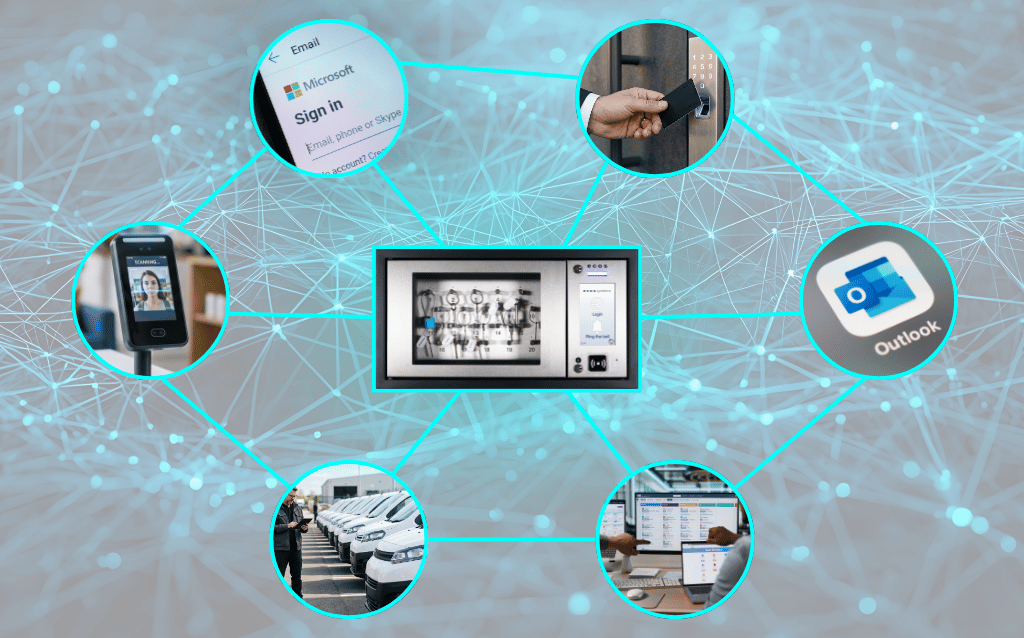
Whether it’s provisioning users with Single Sign-On (SSO) credentials for every system in your organization or allowing facility managers to book keys directly inside Microsoft Outlook, deep system integrations help unify your processes and business infrastructure.

So when you’re evaluating physical key management systems, it is worth taking a little time to look beneath surface claims about integration capabilities. Is the advertised integration just a basic one-time connection, or is it a value multiplier that makes your management systems more effective than the sum of their parts?

This article lays out what you need to know about key management system integrations so you can find the one that best fits your business needs.

Not All Integrations Are Equal

If a vendor hasn’t defined the scope of their product’s integration capabilities, ask. Here is the full range of integration capabilities you might see in modern key management systems.

  • Level 1 - Basic Exports/Imports: You download a spreadsheet file from one system and manually import it into another.
  • Level 2 - One-Way Sync: Data pushes automatically from one system to another over the network. For example, new employee records in your HR system automatically appear in your key management system.
  • Level 3 - Bi-Directional Sync: True two-way communication in which both systems update each other, keeping all datasets synchronized.
  • Level 4 - Real-Time: At this level, updates to users, keys, and other relevant data reach all systems in under a second. For example, if you deactivate one user’s access to a building in your HR system, the key system removes that building's access instantly.
  • Level 5 - Intelligent: Automated decision-making occurs across systems without human intervention.

Vendor integration questions

Ask vendors where their product falls in that range. You could also ask:

  • "Can you show me exactly how data flows between systems?"
  • "What happens when there's a data conflict?"
  • “What workflows can we automate between our systems? Access control and key management?”

Integration Helps You Work Within Existing Workflows

The most powerful integrations are often the least flashy. They’re designed to eliminate friction within your existing business “toolset.” For example, if your fleet manager has to log out of their primary Outlook calendar, where most of their scheduling happens, to deal with vehicle key reservations in another app, there’s too much friction. This wasted overhead time will build up. 

Good, deep integrations aren’t going to help you automate a major project with the snap of your fingers; they’re going to improve dozens or hundreds of tasks daily.

Outlook integration is one of the most effective ways to do this. Single Sign-On (SSO) integration is, too.

Single Sign-On (SSO): Don’t waste time with redundant accounts

Identity access management (IAM) services are a staple of enterprise IT environments. These systems manage user accounts so workers can sign in to email, file shares, HR systems, and other systems based on their role in the organization. Microsoft Azure AD and Okta are two of the most popular options.

Single Sign-On functionality means all your management systems accept the same IAM account credentials.

If your key management system supports IAM accounts, users can access the keys they need with just a few clicks when HR onboards them. Likewise, when they change roles or leave your organization, you can update or deactivate their account instantly. There’s no lag after separation, and there's no chance for account changes to slip through the cracks and create security vulnerabilities. Deep SSO integration unifies all accounts.

While you may think this would be a standard feature in modern key management systems, many vendors either still do not offer it or charge an expensive "enterprise tier" upcharge to access it.

Native Outlook integration: Zero-training key reservations

Back to our fleet manager example, which likely applies equally well to your facilities staff. They usually live in Microsoft Outlook, using it constantly to schedule meetings and coordinate their day.

Rather than forcing them to learn a proprietary booking interface in a new key management system, look for one that natively integrates right into Outlook. Scheduling fleet vehicle usage and associated key signouts becomes as simple as booking a conference room. No training necessary.

Again, while this workflow might seem like a baseline feature of a key system you’d expect to use in a modern workplace, some vendors charge upwards of $3,000 for this functionality as an add-on.

The bottom line: Integrations should generate value

By embedding asset management into your existing business technology “ecosystem,” you can create a snowball effect, where efficiencies compound across your organization.

  • Unified Visibility: You gain a "single pane of glass" view on security across your systems.
  • Faster Adoption: Users are far more likely to engage with workflows that exist in familiar interfaces.
  • Better Compliance: You maintain centralized logs for audits and simpler governance.

How to Do Access Control Integration the Right Way

For many organizations, Physical Access Control Systems (PACS), such as those from Gallagher, are the core of their facility security. They may also use cameras, video communication, or employ security guards, but those typically augment the control provided by their PACS. That means PACS integrations are among the most important to consider in key systems.

Any modern key system with quality PACS integration should have these five capabilities:

Unified credentialing

Complexity is the enemy of security. The more moving parts in a system, the more potential failure points you have. Well-integrated PACS and key systems function as a single unit. Users have one badge that gives them access to everything they need.

User lifecycle management

When you onboard a new employee, their access rights should automatically propagate across both your PACS and your key management system.

Synchronized schedules

Security rules should be consistent across all your infrastructure. Deep system integration ensures consistent access permissions across all systems. A role change in one system is instantly reflected in the other, and vice versa.

Event orchestration

In a deeply integrated system, security events detected in one domain can trigger responses in another. For example, a "door forced open" alarm in your PACS can automatically initiate a lockdown protocol for the relevant keys in your key cabinets until cleared.

Combined reporting

For audits and investigations, you benefit from establishing a single source of truth. If all your account-based security systems are deeply integrated, then there are no duplicate records to cause problems. You can trace a security event across all monitored systems.

Building vs. Buying Integration Quality

Building deep, bi-directional integration requires vendors to make significant, ongoing development investment. Many will simply stop developing at Level 2 integration (One-way sync) because reaching Levels 4 or 5 on the integration spectrum (real-time, intelligent) requires dedicated engineering resources to maintain.

They provide the bare minimum connectivity required to claim integration, possibly leaving your IT team to manage the gaps. As a buyer, you’ll want to distinguish between a vendor that has built a fully productized integration and one that will just create work for your IT team to continue building the capabilities you need.

Questions to validate integration claims

Vendors should be able to answer pointed questions about their product’s integration capabilities. Here are example questions they should be able to answer in detail.

  • "Can you show me integration functions during a live demo?"
    Don’t accept slide decks or diagrams. Ask to see integrations performing live, in a working environment.
  • "What happens when data conflicts?"
    If, for some reason, the user's details differ between your IAM and the key cabinet, which system wins? What kind of reporting will the staff see?
  • "How long does it take for changes to propagate?"
    Ask specifically about the latency, which is the delay between one system sending an update over the network and the other system receiving it. If you revoke access in your main system, does it take 15 minutes or 15 milliseconds to update the key cabinet? If you’re dealing with access changes for a disgruntled employee, a 15-minute delay could create a security incident.
  • "Is [this integration] included or extra?"
    Clarify which integration modules, specifically for essential tools like SSO or Outlook, are included in the base license or carry a surcharge.
  • "How many customers are actively using this?"
    You don’t want to be the beta tester for a newly released feature.

Red flags to watch for

Watch for these warning signs during sales presentations:

  • The "API Magic Wand": Be skeptical of vague claims like "we can integrate with anything via our API." An Application Programming Interface (API) is a digital middleman. It’s a set of rules that lets two different software programs communicate and exchange data. Claiming everything via their API usually puts the burden of development and maintenance on your team, as APIs are rarely truly universal out of the gate.
  • No Specific Proof Points: If a vendor cannot provide specific case studies or examples of the integration in the wild, you may become a product tester.
  • Premium Pricing for Basics: Charging extra for essential enterprise features like SSO or IAM sync. Best case: they’re trying to boost profits; worst case: the vendor treats security as a luxury add-on rather than a core requirement. Where else might that crop up in their design?

Integration as a Competitive Advantage

Comprehensive integrations can become a strategic advantage if they’re well-designed and you understand how to integrate them into your workflows. Business leaders often focus heavily on the hardware—the locks, the sensors, the cabinets. Those are important, of course. But today, more than ever, the long-term value of smart systems investments depends on how well they communicate with the rest of your organizational systems.

By automating compliance, eliminating manual data entry, and synchronizing security events in real-time, you reduce both the administrative burden on your staff and the risk of human error.

See exactly how ecos can make your systems work together.

Fleet Management Best Practices 2026

1 min read

Fleet Management Best Practices 2026

A Fleet Manager’s Complete Guide: Including Optimized Vehicle Utilization, Smart Booking & Data-Driven Assignments The practice of fleet management...

Read More
Critical Infrastructure Security Begins With Asset Accountability

1 min read

Critical Infrastructure Security Begins With Asset Accountability

You might have bleeding-edge cybersecurity ready to pounce on any threat coming over the Internet, but that means nothing if attackers can just gain...

Read More