



Ready to Buy Intelligent Lockers? 6 Things to Settle Before You Sign
Part 3 of 3: Planning a purchase and deployment that pays off from day one
You've done the groundwork. In the first article in this series, we looked at the hidden cost of unmanaged shared equipment: scanners that disappear between shifts, headsets that turn up broken, and supervisors who can't say who had a device last. In the second, we walked through how to evaluate intelligent lockers, from auditing your devices to comparing software and reporting features.
Now you're close to a purchase decision. This is the stage where many locker projects quietly lose value. It's rarely because you chose the wrong locker. It's because you didn't work through the buying and rollout details. The installation costs more than budgeted. The IT security review adds weeks. The compartments don't quite fit next year's scanners. Or fifty workers queue at a single locker bank at 7:00 AM, and supervisors go back to handing out devices from a shelf.
You can avoid every one of those problems with planning. Below are the six questions we hear most often from warehouse and 3PL teams at this stage, and how to answer each one before you sign a purchase order.
1. "Do we need IT to install it?"
Most locker budgets focus on the hardware. The costs that catch teams off guard sit around it: running network cabling across a large facility, adding data drops and electrical circuits, scheduling outside contractors, and booking time from IT and facilities teams who already have full plates. Depending on the building, a single new network drop can run into thousands of dollars in materials and labour, and waiting for one can hold up a project before the lockers are even switched on.
Infrastructure also dictates placement. If a locker needs a wired connection, it tends to end up wherever a network port already exists, not where workers actually start their shift.
The solution: Budget for the total project cost, not the price tag
Ask every vendor on your shortlist to spell out exactly what their system needs on site, then compare the full picture side by side:
|
Cost area |
What to ask each vendor |
|
Hardware and software |
Is software licensing included? Is it a one-time cost or a subscription? |
|
Network |
Does every locker need a data drop, or can it connect over built-in cellular or Wi-Fi? |
|
Power |
How much power does the electronic locker require, plus the devices being charged in the compartments? |
|
Installation |
Who installs and commissions the system, and how long does it take? |
|
Internal time |
How many hours will IT, facilities, and operations need to commit to the project? |
|
Ongoing costs |
What will support, software updates and data connectivity cost after year one? |
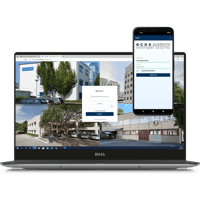
Connectivity is where systems differ the most. Consider intelligent locker platforms with secure, built-in cellular connectivity, so a locker bank doesn't need a dedicated network connection. Paired with a choice of cloud-hosted or on-premises software, that lets you install lockers where they'll have the greatest operational impact: near entrances, dispatch areas, time clocks or existing charging stations, wherever employees naturally begin and end their day.
A simpler installation means less coordination with IT, lower deployment costs and a faster path to results.
2. "Will our IT security team sign off?"
An intelligent locker is a connected device that stores employee identities and access records. Your IT or information security team will want to review it, and if you bring them in at the end, that review can stall a project operations thought was finished. Expect questions like: Where is the data stored? How is it encrypted? How are users authenticated? How are security updates handled? Does the locker need to sit on our corporate network?
The solution: Bring IT in early, with the right documentation
Involve IT at the shortlist stage, not after the purchase order. Ask each vendor for a security package up front that covers:
- Recognized certifications, such as ISO 27001 for information security management
- How data is encrypted, both in transit and at rest
- Hosting options: cloud, on-premises in your own data centre, or standalone
- How software and security updates are delivered, and how often
- Whether the locker can run independently of your corporate network, for example over cellular
A provider that has been through enterprise security reviews will have these answers ready. If they don't, that tells you something too.
3. "Who's going to manage it day to day?"
Warehouse staffing is constantly in flux. New employees are hired, seasonal workers come and go, people move between shifts, and departments restructure. If each of those changes means someone must manually update the locker software, administration becomes one more job for supervisors or IT, and records drift out of date. That's the opposite of why you're buying lockers in the first place.
It's also a security gap. A former employee whose locker access was never revoked still has access to your devices.
The solution: Connect your lockers to the systems you already use
Look for a platform that synchronizes with your existing systems, so user records are managed in one place and changes flow through automatically:
- Identity and access management (IAM): Syncing with Microsoft Entra ID or Active Directory means new hires, role changes, and departures are applied to locker permissions automatically.
- Physical access control (PACS): Letting employees open lockers with the badge or fob they already carry removes a second credential to issue, replace and track.
- Warehouse management (WMS) and ERP: Linking device access to the work itself enables smarter rules. For example, a worker might only be able to check out a long-range scanner when their assigned shift task requires one. You can also enable fault code logging and link to your internal ticketing system to alert your IT team and get broken devices fixed instead of abandoned.
- Open APIs: A documented REST API lets your team build custom workflows and pull locker data into the reporting tools you already use.
Ask vendors which of these integrations are available out of the box and which are custom projects, and who builds and maintains them.
Finally, name a system owner before go-live. Even with integrations doing the heavy lifting, someone, often an operations manager or site IT lead, needs to own the access rules, review reports and act on alerts.
4. "How many compartments do we need, and what sizes?"
Sizing is where warehouse deployments most often go wrong, in both directions. Compartments that are too small can jam devices and damage charging cables. Compartments that are too large waste budget and floor space. Size only for today's fleet and you'll run out of room the next time you grow or add a new device type. And even a perfectly sized locker can fail if an entire shift crowds around one bank at 7:00 AM.
The solution: Size around your devices, your workflows and your growth
Start with your audit. Take the equipment inventory from your evaluation and group every device by size, charging needs and how often it's signed out. Include devices that are currently out for repair. They'll need a home when they come back.
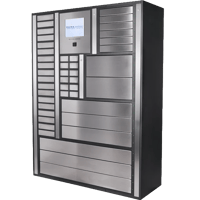
Store kits, not just devices. Many workflows use items together: a voice-picking headset, wearable controller and spare battery, or a handheld paired with a ring scanner. Some intelligent locker systems can track multiple items in a single compartment, using RFID or weight sensing to confirm every piece is present. That can significantly reduce the number of doors you need and the cost, without sacrificing item-level accountability. Not every system can do this, so ask each vendor directly.
Use high-density charging for small devices. For large pools of handheld scanners, radios or mobile phones, ask whether the provider offers compartments that hold and charge several units at once.
Plan for the shift-change rush. During your vendor demo, time a full checkout from badge tap to closed door, then multiply it by the number of workers who start at the same time. If one transaction takes 15 seconds and 60 people start at 7:00 AM, a single terminal means a 15-minute line. Splitting devices across several smaller locker banks, placed close to where work begins, cuts both the queue and the walk.
Leave headroom. One lesson we've learned from years of supporting warehouse deployments: don't design a locker system that's at 100% capacity on day one. Adding just two or three spare compartments per bank absorbs seasonal peaks, temporary workflow changes like extra holiday shifts, and new devices.
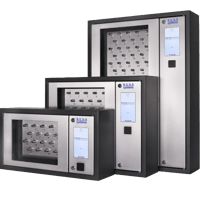
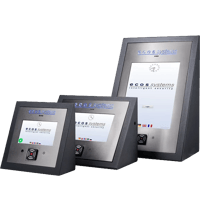
Choose a system that grows with you. If you buy a new fleet of handhelds next year, a rigid system leaves you with two frustrating options: buy a separate standalone locker or put the overflow back on open shelves. Look for modular hardware where additional cabinets connect to your existing control terminal, a wide range of compartment sizes you can mix within the same system, and software licensing that scales with you. Ask what it costs to add a cabinet later, and whether you can reconfigure compartments for different devices.
5. "How do we get the floor to actually use it?"
Even the best locker won't help if workers find ways around it. If the rollout feels like surveillance, or the first week is full of confusing access errors, people will share badges, grab devices on someone else's behalf or go back to hiding their favourite scanner. Adoption is an operations project, not just an installation.
The solution: Pilot, communicate and measure
- Start with a pilot. Choose one zone, one shift or one device type. A few weeks of real use will surface access-rule problems, sizing gaps and placement issues while they're still easy to fix.
- Explain the why. Tell employees what's changing and what's in it for them: a charged, working device waiting at the start of every shift, no more hunting, and a quick way to report faults. Position accountability as fairness. Nobody gets blamed for damage they didn't cause.
- Train shift leads first. Make supervisors the go-to people for questions. Their buy-in sets the tone on the floor.
- Phase in the rules. Set clear expectations from day one, such as returning devices at the end of every shift and reporting faults at the locker. Turn on enforcement features like curfews and overdue alerts once the basics are routine.
- Measure against your baseline. Use the numbers from your equipment audit, including time spent searching, replacement spend, devices out of service and devices not returned at shift end, and compare them at 30, 60 and 90 days. That's how you prove ROI to leadership and build the case for expanding.
6. "Has our provider solved this problem before?"
Every warehouse is different. Device count is only one part of the equation. Shift patterns, seasonal peaks, employee workflows and the software you need to integrate all shape the right solution. A vendor can ship your lockers. A partner helps you make them work in your operation.
The solution: Choose a partner, not just a vendor
The right provider will want to understand your operation before recommending hardware. Questions worth asking:
- Have you deployed in warehouses or 3PLs with shift patterns and device fleets like ours? Can we speak with a reference?
- Will you complete a site survey and recommend locker placement and a compartment mix?
- Who handles installation, configuration and integration, and what's a typical timeline?
- What does support look like after go-live? Do you offer remote diagnostics, and what are your response times?
- How are software updates delivered, and what's included in ongoing costs?
Upfront planning with an experienced partner reduces surprises during implementation, minimizes disruption to your operation and keeps your locker system meeting your needs as your business evolves.
Buyer's checklist
- Total project cost compared across vendors, including network, power, installation and internal time
- IT and security have reviewed each vendor's documentation
- Integration plan confirmed for identity management, employee badges and your WMS or ERP
- A system owner is named
- Compartment plan built from your audit, including kits, charging, repair pool and spare capacity
- Locker placement mapped to where shifts start, with shift-change queues estimated
- Expansion path and costs confirmed
- Pilot scope, employee communication and success metrics defined
- Support model and customer references checked
Intelligent lockers are an accountability platform
Throughout this series, we've looked at the hidden cost of unmanaged shared equipment, how to evaluate intelligent lockers and, here, how to plan a purchase and deployment that avoids the most common roadblocks.
The through line is simple: intelligent lockers are more than storage. When you understand your true needs, evaluate your options carefully and plan the rollout with the same rigour you apply to inventory, they become the system of record for your shared equipment. That means devices are available when shifts start, damage is traced and repaired quickly, and every scanner, headset and pair of smart glasses has a clear chain of custody.
If you're planning an intelligent locker deployment for your warehouse or 3PL operation, we'd be happy to share what we've learned from more than 30,000 installations worldwide. Whether you're just starting your evaluation or ready to scope a rollout, the ecos team can help with site planning, compartment sizing, integration and deployment, so your lockers deliver value from day one.