



4 min read

Pros & Cons of Cloud-Based Physical Key Management Systems 

Pros & Cons of Cloud-Based Physical Key Management Systems

Organizations today are fortunate to have so many options for automating their physical key management. In the past, basic mechanical systems, or rudimentary electronic key cabinets, were the only options. Those worked well for some organizations, but many had business cases for which these systems were not well-suited. 

Cloud-based key management systems have opened many possibilities, and many organizations are already taking advantage of them. Industry research shows that the market for key management and broader access control technology is expected to grow at a notable 8.4% annual rate through at least 2030. And the majority of that growth, the research found, is coming from cloud and service-based systems. 

This trend isn’t that surprising. It reflects a broader shift toward cloud-first operations across both public and private organizations. But does that automatically mean a cloud-based physical key system is right for your organization? 

It’s important to weigh the pros and cons of various options available on the market. That’s what we break down in this article. 

What is Cloud-Based Physical Key Management? 

Cloud-based key management systems operate by using the cloud, a global network of secure data centers. The major advantage of cloud-based technology is its adaptability. Cloud-based key management eliminates the need for local IT infrastructure, making scaling your operations as simple as a few clicks. 

Cloud-based systems also offer strong integration with other security and operational tools. They can create a more connected and comprehensive management setup for your organization by integrating with everything from video surveillance to identity management platforms and even building automation systems. This level of integration helps streamline operations and provides deeper real-time insights. 

Pros and Cons of Cloud-Based vs On-Premises Key Management Systems 

Today, the primary alternative to cloud-based software for key management systems is on-premises infrastructure. In other words, a server running a management application in your own data center. 

Understanding how these systems compare will help you make a more informed decision about which offers the best approach to key management for your organization. 

Pros—Cloud-based Key Management 

    • Scalability Without Complexity: Whether it’s the number of users or the size of your facilities, when your organization grows, so do your key management needs. Adding new doors, users, or locations is simple and fast using cloud-based software. And there’s zero risk of running out of storage space for your key data in the cloud. 

    • Predictable & Lower Upfront Costs: Your on-site infrastructure needs are typically close to zero when your key software is cloud-based. The cloud provider handles all of the infrastructure and storage. You simply pay a periodic service fee. 

    • Automatic Updates: Since they’re fully responsible for the infrastructure, your key system provider handles all software updates, patches, and security. 

    • Reduced Maintenance Burden: Because the provider handles system upkeep, backups, and troubleshooting, internal IT teams are freed to focus on strategic initiatives rather than day-to-day maintenance. Some will even offer support packages, including 24/7 phone support. 

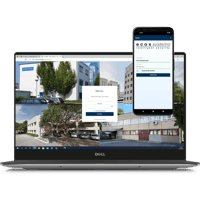
    • Remote Access & Real-Time Management: Administrators can securely monitor events, manage users, and respond to incidents from anywhere. 

Cons—Cloud-based Key Management 

    • Reliance on Internet Connectivity: Because they’re remote, you need an active internet connection to manage cloud-based systems. Ensure your solution includes an on-device database on the key cabinets’ control unit to continue working in the rare event of a total network outage. 

    • Recurring Subscription Costs: Although upfront costs are lower, you will typically incur ongoing subscription fees for cloud-based systems. That may or may not fit with the IT spending model within some organizations. IT may be closely tied to capital spending rather than viewed as ongoing business costs. That may require some budget changes. 

    • Security Perception vs. Reality: Many business leaders still view the cloud as insecure, which can sometimes delay purchasing decisions. If your leadership is still concerned about cloud security, consider educating them on the enterprise-grade security features available in the cloud today, including encryption, zero-trust architecture, and continuous threat monitoring. 

In fact, for smaller businesses, utilizing the cloud for IT security provides access to a slice of enterprise-grade security measures that they might not otherwise be able to afford. 

Pros—On-premises Key Management 

    • Complete Control Over Infrastructure and Data: With everything housed locally, organizations have full control over system configurations, security measures, and data storage. However, this can be both a blessing and a curse. Consider what level of support burden you want to keep in-house. 

    • Customization and Integration Flexibility: Cloud technology is highly flexible, but if you need customizations and integrations with internally developed software, you may need to stick with on-premises solutions. 

    • Fewer Ongoing Fees: Typically, on-premises solutions have a high up-front cost, but then lower ongoing costs. If your organization is comfortable with periodic large expenses, this may be a cost-effective approach. 

Cons—On-premises Key Management 

    • Higher Initial Investment: Deploying an on-premises system typically involves significant capital expenditures, including servers, network and electrical infrastructure, and software licenses, which can be prohibitive for some businesses. 

    • Increased Maintenance Demands: Organizations must manage all aspects of system upkeep, including software updates, security patches, and hardware repairs. Consider whether you have sufficient IT resources in-house before adding an on-premises key management system to your workload. 

    • Limited Remote Management Capabilities: While remote access is possible with additional tools such as VPNs or remote desktop software, it’s often more complex to set up and maintain. Cloud systems are designed for entirely remote access. 

    • Scalability Limitations: As with maintenance, expanding your on-premises key system requires your internal IT resources to manage logistics and absorb the additional costs. Especially so if your organization has multiple locations. 

The Hard Truth: Not All Cloud Services Are Created Equal 

When organizations consider moving to the cloud, they often think they’re just choosing the best price for value among different software-as-a-service (SaaS) solutions. But in reality, not all cloud offerings deliver the same level of performance. 

A basic SaaS platform might give you reliable access to your key management software through a web browser, but that’s it. For some organizations, that might be enough. However, for many, what would truly benefit them is a comprehensive support package, like the ecos care program

Resilient Networking 

Unlike many cloud services used by other key management systems, which rely on customers' Wi-Fi or network to access the cloud, ecos care operates independently of the customer's network. It achieves this by using multiple mobile network providers via a built-in SIM, ensuring continuous connectivity even during outages or disruptions. If one fails or slows down, ecos care simply switches to the next available network to maintain seamless connectivity. This also eliminates the maintenance burden on the customer and improves security as ecos care connectivity is completely separated from their infrastructure.

Automated Data Protection with ISO 27001 

ecos care is also Backup-as-a-Service. You receive regular automated backups and reports without actively managing storage infrastructure. Your data remains ISO 27001- and GDPR-compliant without any additional oversight from your team.  

Intuitive Support 

Basic SaaS services provide a software dashboard, and that’s it. A true Support-as-a-Service provider will handle system maintenance, updates, and troubleshooting for you—no local IT support required. For example, ecos care includes 24/7 telephone support, and since the software is cloud-based, a remote desktop connection is not necessary for troubleshooting. 

The Future of Physical Key Management is in the Cloud 

There is no better time than now to make the leap to cloud-based key management. If you're ready to move beyond outdated infrastructure and unlock the full potential of modern key control. 

Schedule your cloud readiness assessment with ecos systems today

Evaluate your current system, identify migration opportunities, and uncover how a cloud-based key management solution can enhance your security, streamline operations, and support your long-term growth strategy.