





Why True SaaS Software Matters in Physical Key Management
Discover why true SaaS software is essential for efficient, secure physical key management and avoid the hidden costs of on-premises solutions.
6 min read

The reality is that not every organization needs a digital key management system.
For many teams, especially those with few keys and a stable, reliable workforce, a well-organized spreadsheet or logbook is perfectly fine.
At ecos, we build precision-engineered but cost-effective key management systems for busy, regulated, or complex workplaces. And we also understand that “advanced” doesn’t always mean “better.” Pushing automation on organizations that don’t need it isn’t helpful.
This article aims to help you answer one question: Is your current method working, or is it quietly creating too much risk? We’ll walk through when manual tracking is fine and what signs to look for that you might need more.
For many organizations, manually tracking keys is the right solution. It’s simple, low-cost, and often meets operational needs. Here are some of the main conditions under which it makes sense to use simple, manual key tracking processes.
Consider a dental practice with five employees and 15 keys for:
Everyone works the same hours, staff turnover is low, and there’s no requirement for auditable access logs. They want to keep careful track of medical supplies, but managing that key only doesn’t necessitate a digital system. In this example, a well-maintained key log is perfectly functional.
Many organizations will move through different levels of manual key management as they grow. They start simple and refine as needs change or flaws become apparent. If you’re unsure what type of simple key management you need, consider each of these approaches we’ve seen in organizations we work with.
|
Level 1: Labeled Wall Hooks |
With this, you have visual confirmation but no tracking for accountability. This works if everyone follows the rules and keys rarely need to leave the building. If that’s the case, this approach may be enough for you. |
|
Level 2: Wall Hooks and Logbook |
Usually the first change people make is to add some form of tracking. The organization has grown enough or operations are complex enough that missing keys are a noticeable problem. Adding a physical logbook works, again, only if everyone follows the rules. |
|
Level 3: Spreadsheet with Timestamps |
Using Excel or Google Sheets, teams create digital logs with columns for user, key ID, check-out/return times, and purpose. Some even add conditional formatting to highlight overdue returns. This level offers:
Many small businesses operate successfully at this level for years. |
|
Level 4: Shared Spreadsheet with Forms |
We’ve seen small-to-medium-sized organizations start at the previous level and move to this when they need more standardization in data entry. They use Google Forms or Excel data entry forms to standardize inputs and prevent errors. Responses populate a central sheet automatically. This makes it easier for supervisors to monitor in-progress work and to automate reminders for users to return keys. This approach works when your key pool is still small, but your operations require live insights into key availability. |
|
Level 5: Database with Basic Automation |
Forms work for basic data entry, but behind the scenes, they’re still just spreadsheets, which can be too fragile for organizations that need reliable data retention for their own management or for external reporting. In that case, some organizations will build simple custom solutions such as Microsoft Access or Airtable databases. While still technically "manual" in that they lack dedicated hardware, these systems offer many benefits of digital tracking. They are the most robust manual method before complexity demands a purpose-built solution. |
While digital systems solve many limitations of manual tracking, they can be a significant step up. For those staying with pen and paper (or rows and columns), there are some practical ways you can improve efficiency further and reduce risk.
Don’t just use loose sheets of paper. Make a physical binder with:
Use structured templates that include:
Store the file in a shared drive with version history enabled, so changes are traceable. And if you're using Google Sheets, pair it with a form for standardized data entry, which will help reduce typos and missed entries.
If logging key transactions matters to you, whatever type of key system you use, manual, digital, or cloud-based, you need a backup plan. You shouldn’t fail an audit or not be able to make an important business decision just because a logbook accidentally ended up in the trash.
At the end of each week:
Even without software, you can build a defensible audit trail. Train staff to:
Supervisors should conduct random spot checks and sign off on weekly summaries to confirm accuracy.
A key management policy will help keep everyone on the same page, but simplicity is key. Create a one-page policy that defines:
Walk new staff through the key transaction process and all required actions detailed in your policy. Have them complete a test transaction and assign a peer mentor for their first few shifts, who can monitor their adherence to all your policies and procedures.

As your organization grows, there may come a point where your manual key management processes shift from functional to fragile, and that switch rarely comes with a warning. Here are specific triggers to watch for before considering whether it's time for an upgrade to a digital key management system.
If someone on your team is spending more than 2 hours per week chasing keys, verifying logs, or explaining discrepancies, your manual process is costing you meaningful labor.
As with many things, key management processes change significantly at scale. More users mean more handoffs, more exceptions, and exponentially more room for error.
When you have fewer than 20 keys and a stable team, accountability is easier to maintain. At over 50 keys across multiple roles, departments, or shifts, oversight becomes extremely challenging without automation.
A single-site operation can be managed with a binder. But manual coordination might quickly break down when keys are spread across buildings, campuses, or entire cities. Without a centralized system, you lose visibility. Managers can’t see status remotely, and staff won’t know who to ask for a key handoff.
Manual processes usually work fine when your organization has regular hours. They tend to fall apart when it’s 2 a.m., and there’s an emergency. When your organization becomes busier, and night shifts, emergency calls, or weekend technician visits become more common, adherence to manually-enforced policies tends to erode. The expectation that everyone signs a logbook evaporates, and keys get passed informally to keep up with the pace of work.
If you’re launching a search for a missing key every few weeks—especially high-value ones like master or vehicle keys—your system isn’t working. Recurring losses quickly lead to prohibitive rekeying costs, security risks, and erosion of confidence among staff and tenants.
If your policy renewal came with questions about key control, or if premiums have increased due to security concerns, take it seriously. Better documentation may be required to maintain coverage, especially for high-risk assets or regulated facilities.
There’s no universal answer to how you should manage keys. For a 5-person dental office with 15 keys, a well-maintained spreadsheet is probably the right tool. But for a growing property management company with 50+ units, 24/7 access needs, and insurance scrutiny, such a system is a liability waiting to happen.
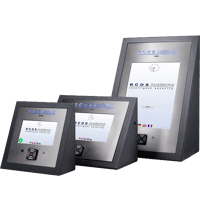
If you want an honest conversation about which key management approach makes the most sense for your organization, we’re happy to have it. ecos key management systems are state-of-the-art, precision-engineered digital tools that are the best solution on the market for complex key control needs. If your organization needs that level of control, we’ll show you how to do it.
Contact ecos systems today to discuss your key management needs.

Discover why true SaaS software is essential for efficient, secure physical key management and avoid the hidden costs of on-premises solutions.
.png)
Key management systems secure physical keys, cut costs, and optimize operations for businesses of all sizes. Get the steps to implement one...

Explore the pros and cons of cloud-based vs. on-premises physical key management systems to determine the best fit for your organization.